If you are a creator in India, you know the struggle. You make good content. But managing all your social media accounts takes too much time. Posting on Instagram, YouTube, TikTok, and LinkedIn separately is tiring. You also want to make money from your content. And you don't want to spend a lot of money on expensive tools.
The best social media apps for creators are the ones that save you time and help you earn money. We have tested many tools. We found the top apps that creators actually use to grow their audience and make real income .
What Makes a Social Media App Great for Creators?
Before we look at the list, let us understand what makes a good creator app. A good app should do three things well :
- Save Your Time: You should be able to schedule posts for all your social media accounts from one place. No need to open each app separately.
- Help You Grow: The app should give you data. You need to know which posts are working and which are not.
- Help You Earn Money: The best apps have features to help you make money directly. This can be through tips, subscriptions, or brand deals.
Read More: How to Grow a Social Media Page Without Ads – Complete Guide for Indian Beginners
Top 10 Social Media Management Tools
These tools help you manage your social media accounts. You can schedule posts, track performance, and engage with your audience.
1. Buffer
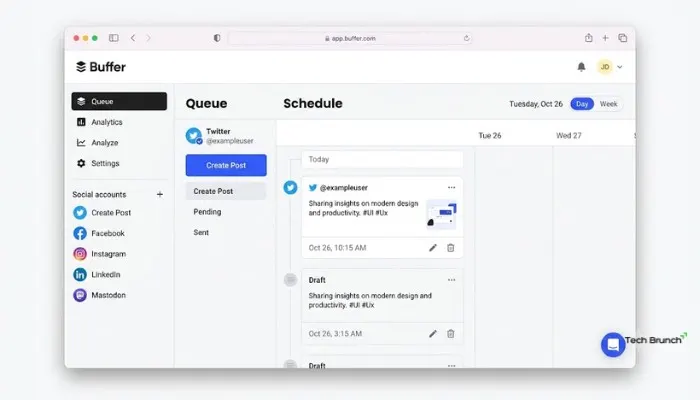
Buffer is the most simple and reliable tool for creators . If you are just starting out, this is the best choice. The interface is clean and easy to use .
You can connect accounts from Instagram, Facebook, TikTok, LinkedIn, and many more .
Key Features:
- Simple scheduling dashboard
- Basic analytics to track performance
- Community inbox to manage all messages
- Free plan available
Pricing:
- Free: $0 (3 channels, limited posts)
- Essentials: $5/month (unlimited scheduling)
- Team: $10/month
Verdict: Best for beginners and solo creators who want a simple tool.
2. Hootsuite
Hootsuite is a powerful and widely used platform . It is built for brands and teams who need deep control.
It goes beyond simple scheduling. It has AI-driven insights and social listening. This means you can track what people are saying about your brand and competitors .
Key Features:
- Schedule across all major platforms
- AI assistant for content ideas and captions
- Unified inbox for DMs and comments
- Social listening to track trends
Pricing:
- Standard: 1,915/month per user
- Advanced: 7,540/month per user
Verdict: Best for teams and growing brands. But it is expensive.
3. Sprout Social
Sprout Social is a premium tool for serious creators and brands . It is known for its deep analytics and reporting .
If you need to understand your audience behavior in detail, this is the tool for you. It helps you deliver consistent customer experiences at scale .
Key Features:
- Advanced reporting tied to business goals
- AI-powered response suggestions
- Social listening for audience insights
- Influencer campaign management
Pricing:
- Standard: $199/month per user
- Professional: $299/month per user
Verdict: Best for analytics and audience research. But it is very expensive.
4. Zoho Social
Zoho Social is a well-balanced tool for small to mid-sized brands . It has a smart scheduling feature that suggests the best time to post.
It also has a visual calendar to plan campaigns. You can track conversations easily with the monitoring dashboard .
Key Features:
- Smart scheduling with best-time predictions
- Visual content calendar for planning
- Real-time monitoring dashboard
- Supports all major platforms
Pricing:
- Free: 0 (1 brand, 6 channels)
- Standard: 600/month
Verdict: Best for small businesses and individuals in India. Good price.
5. Agorapulse
Agorapulse is known for its user-friendly interface and strong focus on inbox management . It helps you manage all your messages and comments from one place .
It is a balanced combination of usability and functionality .
Key Features:
- Unified social inbox with saved replies
- Visual calendar for scheduling
- Reporting and team collaboration
- Competitor analysis
Pricing:
- Standard: $99/month
- Professional: $149/month
Verdict: Best for agencies and brands with high message volume.
6. Sendible
Sendible is built for agencies managing multiple clients . It focuses on structured workflows and client-facing features like white labeling .
You can plan, publish, and analyze from one dashboard. It also has bulk import and content libraries .
Key Features:
- Centralized dashboard for multiple brands
- Smart Compose Box for quick posting
- Automated and white-label reports
- Client Connect for secure onboarding
Pricing:
- Creator: $29/month
- Traction: $76/month
Verdict: Best for agencies managing multiple clients.
7. SocialPilot
SocialPilot is a cost-effective tool for freelancers and small businesses . It offers a good mix of features at a competitive price .
It is a serious choice for those who want breadth without breaking the bank .
Key Features:
- Drag-and-drop calendar for scheduling
- Unified inbox for comments and messages
- White-label reports for clients
- Content curation from RSS feeds
Pricing:
- Essential: $30/month
- Standard: $50/month
Verdict: Best for growing teams on a budget.
8. Loomly
Loomly stands out for its user-friendly collaboration features . If you work with clients or a team, its approval flows are great .
It also suggests post ideas based on trends and events .
Key Features:
- Drag-and-drop calendar with approval workflows
- Post optimization suggestions for copy and hashtags
- Team collaboration with comments and roles
- Content ideas based on trends
Verdict: Best for teams and client work. But pricing is not clear.
9. Later
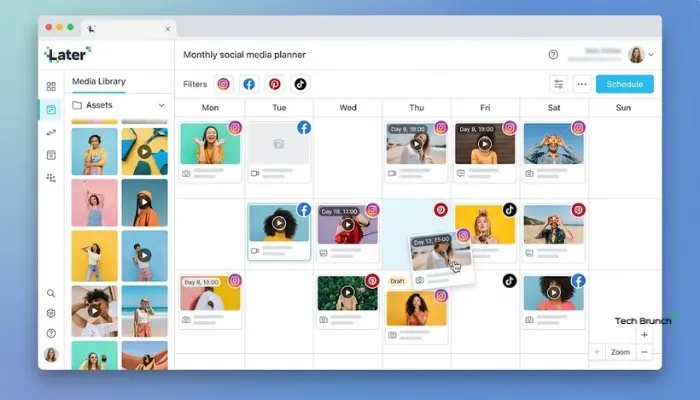
Later is bestfor image-heavy platforms like Instagram . It has a visual planner that makes it easy to drag and drop photos.
It is popular among creators who focus on aesthetics and visual planning .
Key Features:
- Visual drag-and-drop scheduler
- Instagram analytics
- Link-in-bio tool
- User-friendly interface
Verdict: Best for Instagram-focused creators.
10. Pallyy
Pallyy is a lightweight and affordable tool for freelancers and solo creators . It focuses on the core needs: scheduling, analytics, inbox, and link-in-bio .
It is a practical option for those who want a clean and fast platform .
Key Features:
- Easy-to-use scheduler for all major platforms
- Social media analytics
- Unified social inbox
- Bio Link tool
Pricing:
-
Starter: $15/month
Verdict: Best for freelancers and solopreneurs.
Best Apps for Content Creators to Make Money
Now, let us look at the apps that directly help you make money as a creator.
1. Noise - Make Money Creating
Noise is a creator collaboration platform. It is built for influencers, UGC creators, and digital marketers .
The best part? You do not need to be an influencer to start. Even with 0 followers, you can make money .
How it works:
- Explore opportunities from brands.
- Create short-form content for TikTok, Instagram Reels, or YouTube Shorts.
- Share the content on your social platforms.
- Track performance and earnings .
Verdict: Best for creators who want to make money without pitching brands.
2. Patreon
- Patreon is a membership platform. Your fans pay you monthly for exclusive content .
- You can set up different membership levels. You can offer early access, ad-free content, or raw content .
- It provides a stable monthly income. You do not depend on platform algorithms .
Verdict: Best for creators with a loyal fanbase.
3. Kajabi
- Kajabi is a platform to build, market, and sell digital products. You can create online courses, memberships, and coaching programs .
- It is an all-in-one tool. It has email marketing, landing pages, and sales funnels built-in .
Verdict: Best for creators who want to sell courses and coaching.
You May Also Read: Latest Social Media News Today India | Top Trends 2026
Best Free Social Media Apps for Creators
If you have no budget, these free tools are very helpful.
1. Canva
Canva is a full creative suite for content creators. You can design social media graphics, carousels, and thumbnails .
The free tier has over 20,000 templates. You can create professional designs without a design background .
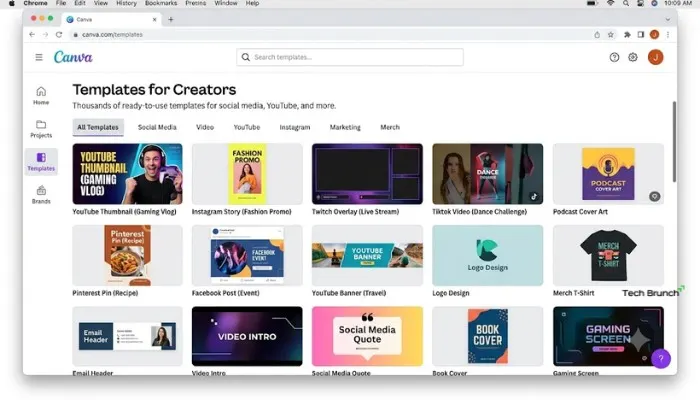
Verdict: Must-have for every creator.
2. CapCut
CapCut is the dominant video editing platform for short-form videos . It has smart templates, auto-captions, background removal, and text-to-speech .
It is optimized for TikTok, Instagram Reels, and YouTube Shorts .
Verdict: Best free video editor for short-form content.
3. Substack
Substack is the go-to platform for writers. You can build a direct relationship with your audience through newsletters .
It has built-in paid subscription support. The platform takes 10% of your subscription revenue .
Verdict: Best for writers and thought leaders.
Quick Tips for Creators
-
Start Simple: Begin with free tools like Canva and CapCut. Use the native scheduling tools on the platforms. Do not buy expensive tools until you need them .
-
Use AI Tools: AI tools like ChatGPT can help you with ideas, scripts, and captions. This saves you a lot of time .
-
Focus on Content: The best tool is the one you will use consistently. Do not waste time trying every tool. Focus on making good content .
Final Words
The best social media apps for creators are the ones that fit your work style. If you are a beginner, start with Buffer, Canva, and CapCut. These are free and simple.
If you are an agency or a brand, invest in tools like Hootsuite or Sendible. If you want to make money, explore Noise or Patreon.
Choose the tools that help you save time and create better content. That is how you grow as a creator.
FAQs
1. Which free app is best for beginners?
Canva for designs and CapCut for videos. Both are free and easy. Buffer free plan also works for scheduling.
2. Can I earn money with zero followers?
Yes. Use Noise app. Brands pay you to make content. You do not need big following.
3. Do I need paid tools?
No. Free tools are enough for starting. Buy paid tools only when you grow.
4. Which app posts to all platforms at once?
Buffer and Zoho Social. Write once, post everywhere. Saves time.
5. Best free video editor?
CapCut. Free, simple, has templates and auto-captions. Most creators use it.