
Analytics tools tell you what is working. Without them, you are guessing. For startups, the right tool answers two questions. Where are visitors coming from? Are they doing what matters? Everything else is noise until you know those answers.
This guide covers the best website analytics tools for startups in 2026. Google Analytics 4 is the industry standard and free. PostHog is built for product teams with a generous free tier. Microsoft Clarity is free forever for UX insights. For privacy-focused founders, open-source tools like Umami, Plausible, and Matomo offer full data ownership. We cover free options, GitHub projects, and how to choose. Start with one tool. Track two numbers. Ignore the rest.
What Startups Should Actually Track?
Before picking a tool, know what you need. Most startups drown in dashboards that answer questions they never asked. Focus on two things first :
- Traffic source. Which channels bring people in. Organic search. Social. Direct. Referrals. This tells you where to spend your time.
- Conversion event. The one action that matters. Signup. Trial. Purchase. Billing.
Bounce rate and session duration feel important. They rarely change a decision. Guard your attention. Track what moves the business forward.
Read More: AI Tools for Startup Marketing That Actually Work in 2026
Best Free Website Analytics Tools for Startups

Google Analytics 4 (GA4)
GA4 is the industry standard. It is free. It integrates with Google Ads, BigQuery, Firebase, and Looker Studio. It offers predictive metrics and cross-platform tracking .
- Strengths: Completely free unless you upgrade to GA360. Massive community and documentation. Tight Google ecosystem integration .
- Weaknesses: Data sampling in the free version. Privacy concerns (Google-hosted, no data ownership). Complex interface with a steep learning curve. Requires cookie consent banners .
- Best for: Marketing teams that need Google Ads integration and attribution modeling .
PostHog
PostHog is a product analytics platform with session replay, feature flags, and A/B testing. It is open source and offers a generous free tier of 1 million events per month .
- Strengths: All-in-one product analytics suite. Self-hosting option available. MIT licensed. Includes experimentation tools .
- Weaknesses: Complex initial setup. Resource-intensive for self-hosting. Usage-based pricing scales quickly. Technical learning curve .
- Best for: SaaS and product teams that need funnels, cohorts, and experiments .
Microsoft Clarity
Clarity is completely free forever. No limits. It offers heatmaps, session recordings, and frustration signals. The core library is MIT-licensed .
- Strengths: Free with no traffic or feature limits. Excellent UX insights. Automatic heatmaps and recordings .
- Weaknesses: Not a full analytics platform. Microsoft-hosted only. Limited data export options. Data stored with Microsoft .
- Best for: UX optimization. Pair it with a traffic analytics tool for complete coverage .
Best Open-Source Website Analytics Tools (GitHub)
For startups that want data ownership and no vendor lock-in, open-source tools are the answer.
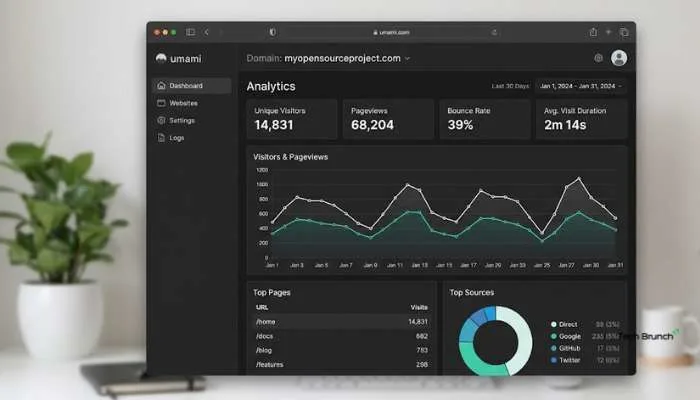
Umami
- Umami is a simple, fast, privacy-focused alternative to Google Analytics. It has over 22,000 GitHub stars . MIT licensed .
- Strengths: Self-host for free. Own your data. No cookies needed. Lightweight. Very straightforward to use .
- Weaknesses: Basic traffic and event tracking. Lighter on analysis features. Each stored property counts as an event .
- Best for: Founders who run their own server and care most about data privacy .
Plausible Analytics
- Plausible is a lightweight (less than 1KB script) privacy-focused analytics tool. It has over 20,000 GitHub stars . AGPL open source .
- Strengths: Ultra lightweight. Cookieless privacy by design. Dead simple to use. Self-host free .
- Weaknesses: Limited product analytics. No session replay or heatmaps. Few integrations. Basic web analytics only .
- Best for: Blogs and content sites that want simple, privacy-friendly metrics .
Matomo
- Matomo is an open-source, full-featured analytics platform with strong data ownership. It has nearly 20,000 GitHub stars . GPL license .
- Strengths: Full data control and ownership. Free open-source core. Excellent privacy features. Rich feature set. Self-hosting option .
- Weaknesses: Complex setup and maintenance. Premium features require paid add-ons. Higher infrastructure costs. Steeper learning curve .
- Best for: Enterprises with privacy requirements. Teams that need GA-level depth but want data on their own infrastructure .
GoatCounter
GoatCounter is an open-source web analytics platform. It is privacy-aware, lightweight (adds about 3.5KB), and doesn't need a GDPR notice. It identifies unique visits without cookies using a non-identifiable hash .
- Strengths: Easy to use. Privacy-friendly. Accessible interface. Can be self-hosted or used as a free hosted service. Supports JavaScript-free tracking .
- Weaknesses: Simpler feature set than Matomo. Hosted service has limits .
- Best for: Startups that want a simple, privacy-friendly tool without the complexity of GA or Matomo .
Tiny Analytics
Tiny Analytics is a minimal, privacy-focused web analytics tool. It is self-hosted, uses no cookies, and stores no personal data. It is a single Python file with templates .
- Strengths: Privacy-first. Lightweight. Bot filtering. Time on page tracking. Geo and device breakdown. MIT licensed .
- Weaknesses: Very minimal feature set. Single developer project. Limited community support .
- Best for: Developers who want a tiny, self-hosted analytics tool they can deploy in minutes .
You May Also Read: Ecommerce Startup Ideas for Beginners: Simple Business Ideas
Quick Comparison: Best Analytics Tools for Startups
| Tool | Type | Free Option | Data Ownership | Best For |
|---|---|---|---|---|
| Google Analytics 4 | Freemium | Yes | Google-hosted | Marketing teams |
| PostHog | Open-source/Freemium | 1M events/month | Self-host option | Product teams |
| Microsoft Clarity | Free | Yes | Microsoft-hosted | UX optimization |
| Umami | Open-source | Self-host free | Full | Privacy-focused founders |
| Plausible | Open-source | Self-host free | Full | Content sites |
| Matomo | Open-source | Self-host free | Full | Enterprises |
| GoatCounter | Open-source | Free hosted/self-host | Full | Simplicity |
| Tiny Analytics | Open-source | Self-host free | Full | Developers |
How to Choose the Right Tool?
- Start with your primary goal. Marketing? Go GA4. Product analytics? Go PostHog. UX? Add Microsoft Clarity. Simple traffic? Go Umami or Plausible .
- Check data privacy needs. If you serve EU users, privacy-friendly tools skip cookie banners. That means fewer popups and more real data .
- Consider your technical capability. Self-hosting is free but requires server maintenance. If you do not want to touch infrastructure, use a hosted free tier .
- Do not overthink it. Any of these tools tells you the two things that matter. The differences only show up at real volume. The worst move is spending a week comparing tools instead of shipping .
FAQs
1. Best free analytics tool for startups?
Google Analytics 4. Free. Industry standard. But hard to learn. Microsoft Clarity is also free. No limits. Heatmaps and recordings.
2. Open-source options on GitHub?
Yes. Umami. Plausible. Matomo. GoatCounter. Tiny Analytics. All free to self-host. You own the data.
3. GA4 or something else?
Depends. GA4 for marketing. PostHog for product funnels. Umami for simple traffic. Plausible for privacy. Pick what fits.
4. Best for privacy compliance?
Plausible. Matomo. GoatCounter. No cookies. GDPR ready. No banner needed.
5. Need more than one tool?
Not always. Many use GA4 plus Microsoft Clarity. Clarity is free. Pairs with anything.
6. What to track first?
Two things. Where visitors come from. Do they convert. Rest can wait. Bounce rate rarely changes decisions.
7. Self-hosting free?
Yes. If you have a server. Software is open source. Small sites use tiny resources. Cost is setup time.
8. Track signups?
Yes. Most tools do custom events. PostHog is built for it. Fire an event on signup. Watch your funnel.