Managing social media takes time. Too much time. Writing captions, making visuals, scheduling posts, and tracking results. It is exhausting. That is why AI tools are becoming essential. They save hours, help you post consistently, and make your content better.
But picking the right tool is hard. There are so many options. Some are free. Some cost money. Some are good for writing. Others are better for visuals or scheduling. This article covers the best AI tools for social media marketing. We focus on free options that actually work.
The Free Starter Stack
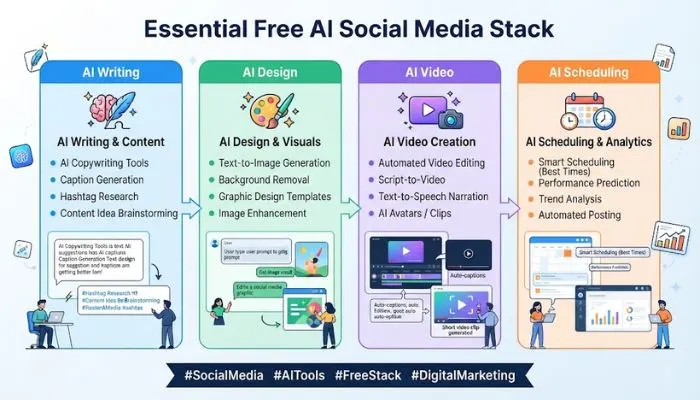
If you are on a budget, you can run your entire social media presence with free tools. Here is the stack that works.
- Writing: ChatGPT free plan handles captions, hooks, and post ideas. It can also repurpose content across platforms.
- Scheduling: Buffer free plan covers three channels. You get basic scheduling and the AI Assistant for captions.
- Design: Canva free plan gives you templates, AI design support, and simple visuals. The same account works for Instagram and Facebook.
- Video: CapCut free tools handle short-form editing, captions, background removal, and effects.
This stack costs nothing. It covers the basics. Upgrade later when the free tier creates a real limit.
Read More: How to Grow a Social Media Audience Organically for Free
AI Tools by Platform
Facebook organic reach is shrinking. Every post takes more effort for fewer eyes. Three tools cover most of what you need.
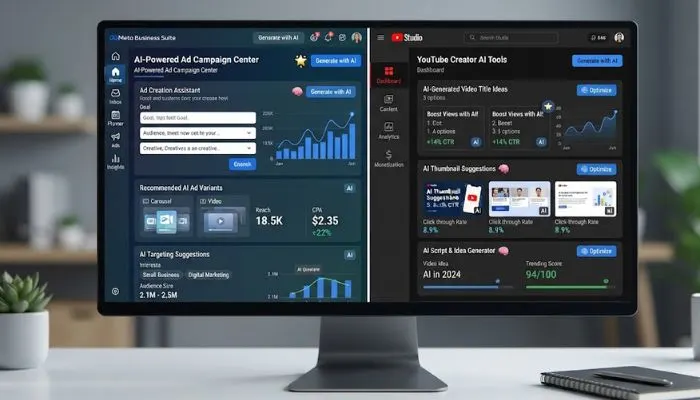
- Meta AI is free and lives inside Business Suite. It suggests captions and generates images. No extra login required. If you already post from Business Suite, start here.
- Canva handles the visual side. Facebook cover photos, event graphics, and carousel posts. The designs stay consistent across platforms.
- Hootsuite OwlyWriter AI works if you post on multiple platforms. It writes captions from a topic or link. Repurposes one post for Facebook, Instagram, and more. Schedules everything from one dashboard.
YouTube
YouTube announced a major creator-AI overhaul in late 2025. Features are rolling out in 2026. Before you pay for a third-party tool, check what is already in YouTube Studio. Some of what TubeBuddy or VidIQ charge for may now be free.
Use the free native tools for ideas and titles first. Only pay when you hit a job YouTube still cannot do, like editing or repurposing.
AI Tools for Content Creation
Writing and Copywriting
- ChatGPT and Claude are strong for writing. They handle captions, hooks, scripts, and reply templates. The free versions are enough for most social media teams.
- OpenAdKit is an open-source alternative to Jasper and Copy.ai. It has 18 AI generators, 11 optimizers, and supports 9 AI providers (Claude, GPT, Gemini, Groq). Browser-only, no backend, no subscription. Monthly cost is $0 compared to $49–999 for paid tools.
Visuals and Design
- Canva Magic Studio and Adobe Firefly are useful for visuals. Canva is free to start. Firefly creates commercially-safe images.
- Synup AI Content Assistant generates post ideas and matching visuals in one step. It is built for marketing agencies managing multiple client locations. The assistant uses each client's business type, location, and brand to create content that fits the local market.
Video
- CapCut free tools cover short-form editing, captions, and effects. OpusClip is good for repurposing long-form content into shorts.
- Veo 3.1 Fast generates TikTok-style videos from text prompts. Vertical format, 9:16, cinematic. Available through inference.sh CLI with pay-per-use pricing.
Carousel Generation
open-larryloop is an open-source tool that generates and publishes viral carousel slides automatically. It analyzes a website, creates 6 slides (hook, problem, agitation, solution, feature, CTA), and posts to TikTok and Instagram. Free tier uses Gemini API. No credit card required.
AI Tools for Scheduling and Management
- Buffer free plan covers three channels. The AI Assistant drafts captions and reshapes them for each channel. Schedules posts across all connected accounts. Shows cross-channel analytics in one dashboard. The free plan runs Instagram, TikTok, and Facebook without paying.
- Later is for visual planning. Drag-and-drop calendar, link-in-bio page, and caption AI that adjusts tone for each platform.
- SocialBee handles evergreen content. It recycles content and creates platform-specific variations.
- Free AI Social Media Scheduler is an open-source alternative to Buffer and Hootsuite. Built with Next.js. Upload videos, schedule posts, publish to YouTube and TikTok. No subscription required. MIT license.
AI Tools for Engagement
- Olly is a free personal AI social media agent. It writes comments, summarizes content, creates posts, and checks viral scores. Works on LinkedIn, X, Instagram, Facebook, and 10+ platforms. Supports local models (Llama-3.1, Gemma 2) so you can use it forever for free. Paid users have grown to over 2,500.
- Bolta is an AI social media copilot. Train it on your writing so AI posts sound like you. Schedule and publish across multiple platforms. Inbox-style approvals for teams. Replace Notes + ChatGPT + Notion + schedulers with one system.
Time Savings Calculator
AI social media tools save marketers an average of 10 hours per week. Here is where those hours come from:
| Task | Manual | With AI | Saved |
|---|---|---|---|
| Writing captions | 3.5 hrs | 45 min | 2.75 hrs |
| Graphic design | 2.5 hrs | 30 min | 2 hrs |
| Scheduling | 1.5 hrs | 15 min | 1.25 hrs |
| Video editing | 2.5 hrs | 25 min | 2 hrs |
| Analytics review | 1.5 hrs | 20 min | 1.2 hrs |
| Total | 11.5 hrs | 2.1 hrs | ~10 hrs |
At Sprout Social's $249/month price point, the recovered time pays for itself within the first two working days of the month.
You May Also Read: The Importance of Social Media Algorithm for Business
How to Build Your Stack?
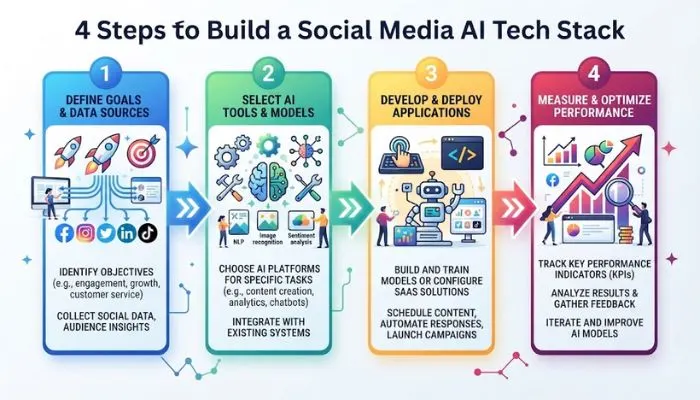
Here is a simple approach:
Start with the free stack:
- ChatGPT for ideas and captions
- Buffer for scheduling
- Canva for design
- CapCut for video
Add one tool at a time. Do not try everything at once. Pick the tool that solves your biggest pain point. Use it. Get comfortable. Then add the next tool.
Review everything before publishing. AI does not replace human judgment. Check facts, brand voice, platform fit, and originality. Weak prompts and unchecked claims hurt performance.
The Bottom Line
The ideal AI tools for social media marketing are the ones that work best for you. You can learn the basics of writing, design, scheduling and video on a free stack. Paid tools supply added scale, branding, and sophisticated capabilities. Use ChatGPT, Buffer, Canva and CapCut. Grow specialized tools as necessary. Savings in time are real. 10 hours a week is not that much. Take advantage of that time to make improved content and genuine connections with your audience.
FAQs
1. What free AI tools should I use for social media?
Start with these. ChatGPT for captions and ideas. Buffer free plan for scheduling up to three channels. Canva for designs. CapCut for video editing. All are free. Meta AI inside Business Suite also works for Facebook. This stack covers everything you need.
2. Can I manage social media with only free tools?
Yes. The free stack works for most small businesses. ChatGPT writes. Buffer schedules. Canva designs. CapCut edits videos. You only need paid tools when you hit limits on posts, channels, or team size.
3. Which tool is best for writing captions?
ChatGPT and Claude work well. They generate hooks, captions, and replies. Free versions are enough. OpenAdKit is another option with no subscription. It supports multiple AI models.
4. Can I use AI-generated images for business?
Adobe Firefly creates commercially-safe images. Canva also offers AI image generation. Check terms before using other tools. Some free generators restrict commercial use.
5. How many hours can AI save each week?
Around 10 hours. Writing captions drops from 3.5 hours to 45 minutes. Design drops from 2.5 hours to 30 minutes. Video editing drops from 2.5 hours to 25 minutes. Use that time to create better content and connect with your audience.