
Moving a big company to the cloud is hard. It takes time and planning. Many organizations try and struggle. Costs go up. Projects get delayed. Things break. A clear enterprise cloud migration strategy helps you avoid these problems.
This guide covers the key steps. Figure out what you have. Set goals you can measure. Pick how you will move each workload. Execute in phases, not all at once. Test and optimize after each wave. We also cover the challenges you will face. Cost overruns. Security gaps. Skills shortages. And how to handle them.
Start with assessment. Move in phases. Keep optimizing. That is the framework.
What Is Enterprise Cloud Migration?
Enterprise cloud migration means moving an organisation's digital assets from on-premise infrastructure to cloud platforms. This includes applications, databases, and IT resources. The goal is to improve scalability, reduce costs, and enable innovation.
Cloud migration is rarely a single event. It is a phased process that balances business priorities, operational risk, and organisational readiness.
Read More: Generative AI for Enterprise: Use Cases, ROI and Growth
The 5-Step Migration Framework
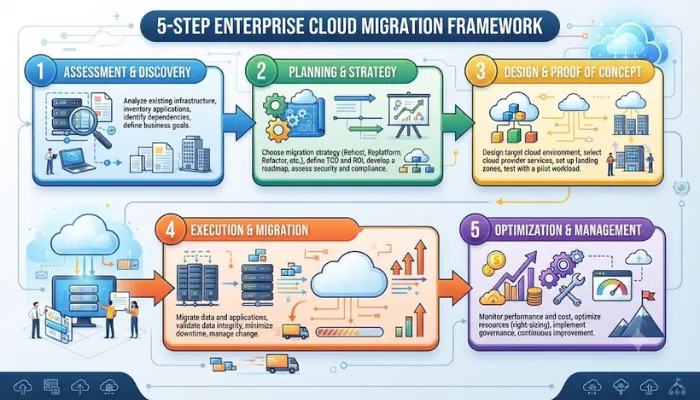
Step 1: Assess Your Current Estate
Before you move anything, you need to know what you have. Map every application, dependency, and data flow. Skip this and you will discover the hard way what depends on what .
Key activities:
- Evaluate application compatibility
- Identify team skill gaps
- Review licensing issues
- Check data sovereignty requirements
Major cloud providers offer structured readiness assessment tools. AWS Migration Evaluator, Azure Migrate, and Google Cloud Migration Center can help with discovery and cost analysis .
Plan for 2-4 months for this phase in large enterprise portfolios. Rushing it creates dependency gaps that compound later .
Real example: Hays, a global recruitment company, received a sudden data centre closure notice. Instead of rushing, they deliberately paused. They mapped every connection, dependency, and hidden service before touching anything. This period laid the foundation for everything that followed .
Step 2: Set Goals and Pick Migration Strategies
Set measurable goals tied to business outcomes. Examples:
- Reduce infrastructure costs by X%
- Improve application uptime to Y%
- Accelerate deployment frequency by N days
Define the KPIs that will prove those outcomes post-migration .
The 7 Rs of Migration:
| Strategy | What It Means | When to Use |
|---|---|---|
| Rehost (Lift-and-Shift) | Move as-is to the cloud | Fast migration, minimal changes |
| Replatform | Move with some cloud optimizations | Balance speed and benefits |
| Refactor | Rewrite for cloud-native | Long-term value, complex apps |
| Repurchase | Replace with SaaS | Legacy applications |
| Retire | Decommission | Unused or low-value systems |
| Retain | Keep on-premise | Compliance or latency reasons |
| Re-architect | Redesign the application | Strategic transformation |
Most enterprise migrations use a mix. According to AWS migration studies, roughly 35-50% of workloads are rehosted, about 20% are replatformed, and only about 10% undergo full refactoring during migration .
Step 3: Design the Target Architecture
Design the cloud architecture covering:
- Which cloud model fits your needs: public, private, hybrid, or multicloud
- Which provider aligns with your workload profile
- Network topology (VPC design, connectivity, security zones)
- Identity management and access controls
- API gateways and integration with existing systems
For enterprises with complex ERP, finance, or tax systems, integration complexity is consistently underestimated. Mapping dependencies across SAP, Oracle, or Microsoft Dynamics environments requires deliberate planning .
Real example: Revionics, an AI pricing company, chose Google Cloud. Their decision was as much cultural as technical. They ran pilots across multiple vendors, but the partnership dynamic open, honest, willing to self-assess matched how they operate internally .
Step 4: Execute Migration in Phases
Implement the migration in defined waves. Start with low-risk, low-dependency workloads to build experience before moving business-critical systems .
Each wave should include:
- Defined cutover plan with rollback procedures
- User communication protocol
- Performance baseline measurements
- Parallel-run periods for critical systems
- Disaster recovery plans tested before go-live
- Source environment set to read-only before final cutover
Wave-based execution reduces risk and allows teams to learn from initial deployments. This significantly reduces the likelihood of unplanned downtime .
- Real example: Revionics completed a full Google Cloud migration in just over two years against a three-year plan. The team structure was the single biggest factor in finishing early. They created "tiger teams"—separating migration-focused engineers from those delivering daily service—so neither group carried the cognitive load of the other's work .
- Real example: METRO, an international wholesaler, completed a multi-year data centre migration to Google Cloud. The project was delivered through a phased and risk-controlled approach, allowing transition while maintaining operational continuity .
Step 5: Validate, Optimise, and Govern
After each migration wave, conduct structured validation with actual end users. Verify that workflows, integrations, and performance meet or exceed the pre-migration baseline .
Post-migration focus areas:
- Performance monitoring: Real-time dashboards and alerting
- Cost optimization: Regular reviews using cloud-native tools
- Security posture: Continuous compliance monitoring
- Regular review cycle: Reassess retained workloads
Enterprises that stop at day-one cutover typically spend the next 12-18 months chasing performance issues, runaway costs, and monitoring gaps they did not anticipate .
You May Also Read: Enterprise AI Productivity Trends 2026: Top 10 Insights
Migrate-Then-Modernize: The Pragmatic Approach
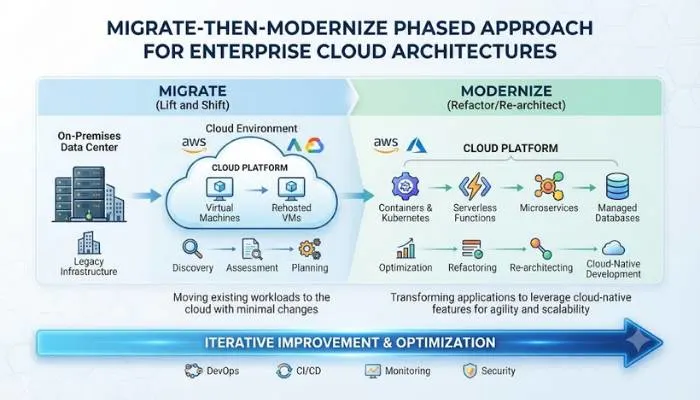
A common pattern for large enterprises is: Migrate → Optimize → Modernize .
This sequence allows organisations to gain immediate cloud benefits while creating a foundation for long-term innovation.
Phase 1: Migrate
- Move workloads to the cloud
- Immediate benefits: consumption-based pricing, elimination of hardware refresh cycles, faster provisioning
Phase 2: Optimize
- Rightsize resources (many on-premises servers operate at only 12-18% utilisation)
- Use commitment-based pricing (Savings Plans, Reserved Instances)
- Implement elasticity and auto-scaling
Phase 3: Modernize
- Move databases to managed services (reduces operational overhead)
- Replace expensive commercial software with cloud-native alternatives
- Introduce AI and advanced analytics
This approach reduces risk while accelerating time-to-value .
Common Challenges and How to Handle Them
Challenge 1: "Lift-and-Shift Is Good Enough"
Many enterprises choose rehosting for most workloads, then discover post-migration that cloud costs are higher than expected. The cause: workloads were never optimised for cloud pricing models.
Solution: Use rehosting deliberately as a first step, then plan for a modernization wave after initial migration .
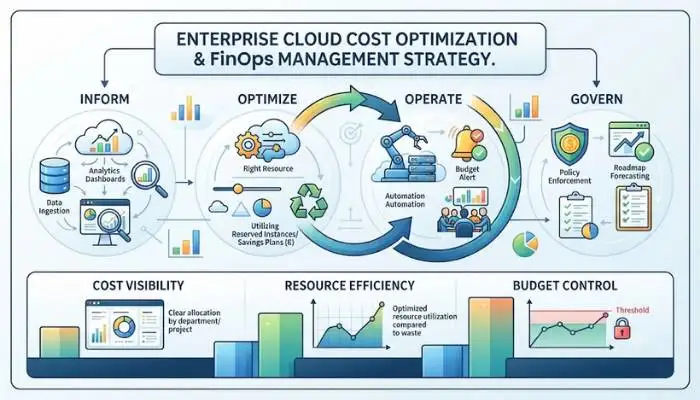
Challenge 2: "Cloud Is Automatically Cheaper"
Cloud cost overruns are among the most reported post-migration pain points. Flexera's 2025 State of the Cloud report found that organisations estimate 29% of their cloud spend is wasted .
Solution: Implement FinOps discipline. Use cost management tools, right-size resources, and review budgets regularly throughout the migration process .
Challenge 3: Downtime and Service Disruption
When workloads are moved, services can be unavailable for short periods, impacting business and customer experience .
Solution: Use a phased migration approach. Test workloads in the cloud environment before full migration. Maintain rollback procedures for every cutover .
Challenge 4: Data Security and Compliance
Moving sensitive data to the cloud exposes it to potential breaches or misconfigurations if not properly secured .
Solution: Implement robust encryption and strict access control. Encrypt data in transit and at rest. Use role-based access management. Conduct regular audits of the cloud environment .
Enterprise Cloud Migration Strategy Template
A proper migration template helps you document everything. Here is what it should include .
Operating Model and Responsibilities
- Specify whether your operating model is shared management, centralised, or distributed
- Define and assign responsibility for the platform and workload(s)
Workload Business Details
- Workload name and description
- Workload owners and business owners
- Business unit and business processes affected
- Criticality level (high, medium, low)
- Data sensitivity and compliance requirements
- Maintenance windows and business freeze periods
Workload Technical Details
- Current architecture and configuration details
- Application code details (programming languages, frameworks)
- Databases (engine types, versions, hosting models)
- Performance metrics (CPU, memory, IOPS, throughput)
- SLAs (RTO/RPO)
- Dependencies (internal and external)
- Security (authentication methods, encryption, firewall rules)
The Bottom Line
Enterprise cloud migration is a long-term transformation, not a one-time project. The most successful organisations follow a structured approach: assess thoroughly, plan carefully, execute in phases, and optimise continuously.
The migrate-first strategy works well for most large enterprises. Move workloads to the cloud first, then optimise for cost and performance, and finally modernise selectively where it makes business sense.
Get the foundation right. Map dependencies before you start. Use dedicated migration teams. Build governance from day one. And remember, cloud migration is not the finish line. It is the start of a continuous improvement journey.
FAQs
1. What is an enterprise cloud migration strategy?
A plan for moving company systems from on-site data centers to the cloud. It covers what to move, how, and in what order.
2. How long does a migration take?
Most companies take two to three years. The first step alone takes 2-4 months. Revionics finished in two years, ahead of their three-year target.
3. What are the 7 Rs?
Migration strategies. Rehost, Replatform, Refactor, Repurchase, Retire, Retain, Re-architect. Most firms use a mix.
4. Modernize before or after migration?
After. Refactoring during the move is risky and slow. Move first, stabilize, then improve.
5. How do I stop costs from blowing up?
Use FinOps. Track spending with built-in tools. Right-size resources. Use reserved pricing for steady workloads. Review costs every month.
6. What are the risks?
Data loss, downtime, cost jumps, security gaps, lock-in. All fixable with good planning. Test rollbacks before every cutover. Encrypt everything.
7. Can I move everything at once?
No. Move in phases. Start with low-risk systems first. Build experience. Then move the important stuff.
8. What about the skills gap?
67% of CIOs struggle to find cloud talent. Train your team. Hire experts. Or use a managed partner. They bring skills without the hiring hassle.