It's no secret, today's student has to deal with schoolwork, assignments, a job, and socializing. Your cell phone can be your greatest distraction or your greatest study partner. Which is why it is important for students to know which are the best free productivity apps.
There are no expensive software or complicated tools required to keep yourself organized and focused. There are free applications available that can help you manage your time better, take smarter notes, memorize a tough topic and even block distracting sites without spending a single rupi out of your pocket. This guide breaks down the best free apps for Indian students that they are using to study efficiently but not harder.
Why Students Need Productivity Apps?
Let’s face it. The old way of studying does not always work. Writing long notes, reading textbooks for hours, and trying to remember everything is tiring. Free study apps for students solve this problem .
Good apps help you:
- Save time: Instead of searching for notes, everything is in one place.
- Stay focused: They block distractions and help you concentrate.
- Remember more: Features like flashcards and spaced repetition improve memory.
- Reduce stress: When you are organized, you feel less anxious.
The goal is not to use many apps. The goal is to find the ones that fit your needs. Let me show you the best options.
Read More: Best Mobile Phones for Social Media Creators in India (Budget and Top Picks)
Best Apps for Organization and Planning
Good organization is the key to academic success. If you know what to do and when to do it, you save a lot of time and mental energy. These are the best apps for students to study and stay organized.
Notion: Your All-in-One Study Hub

Notion is like a digital brain for students . It is completely free for personal use. Many students use it as their main organizational tool .
What it does:
- You can create notes for each subject
- Make to-do lists for assignments
- Build study schedules
- Track your goals and deadlines
Why students love it: Notion is very flexible. You can set it up the way you like. Some students make beautiful dashboards. Others keep it simple with basic notes . It works on your phone, tablet, and computer. Everything syncs automatically.
Getting started: Start simple. Create a page for each subject. Add a to-do list for weekly tasks. As you get comfortable, you can add more features like calendars and project trackers.
Google Calendar: Never Miss a Deadline
A digital calendar is essential for students . Google Calendar is free, easy to use, and works with all devices. It helps you plan your lectures, study sessions, and deadlines .
What it does:
- Shows your schedule at a glance
- Reminds you about upcoming deadlines
- Lets you color-code different activities
Pro tip: Block out specific times for studying on your calendar. Treat them like important classes. If you do this, you will study regularly and avoid last-minute stress.
Google Tasks: Simple To-Do Lists
Sometimes you just need a simple list. Google Tasks is a great free option . It works well with Google Calendar.
What it does:
- Create simple to-do lists
- Add deadlines and reminders
- Break big projects into small steps
Example use: You can make a list of all the chapters you need to read for an exam. Check them off as you finish. The feeling of checking off tasks keeps you motivated.
Best Apps for Note-Taking
Good notes are the foundation of effective studying. The right note-taking app can make a big difference.
OneNote: For Detailed Notes
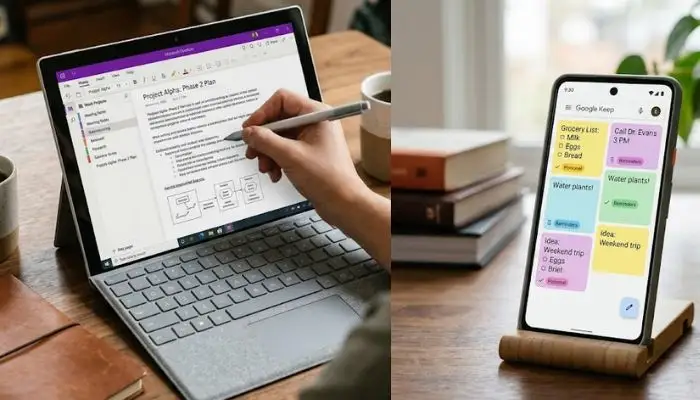
OneNote is a powerful note-taking app from Microsoft . It is free and works well for students who take detailed notes.
What it does:
- Type notes or write with a stylus
- Add images, audio, and videos to your notes
- Organize notes by subject and topic
Why students like it: You can create notebooks for each subject. Inside each notebook, you can create sections and pages. This structure helps you find information quickly .
Google Keep: For Quick Notes
For short notes, ideas, and reminders, Google Keep is excellent . It is simple and fast.
What it does:
- Create notes, lists, and voice memos
- Add labels to organize your notes
- Set reminders based on time or location
Example: You are in the library and find a useful book. You can quickly note down the reference in Google Keep.
Best Apps for Focus and Concentration
Staying focused is hard, especially with social media always a tap away. These best free productivity apps for students android help you study without distractions.
Forest: Turn Focus into a Game
Forest is a popular app that makes focusing fun . It uses a simple idea.
How it works:
- You set a focus time
- A virtual tree starts growing
- If you leave the app, the tree dies
Why it works: You do not want to kill your tree. This simple motivation helps you stay off your phone . It also uses the Pomodoro technique of 25 minutes focus and 5 minutes break .
Real student feedback: "Forest grasps productivity in a surprising, motivating manner" . Many students say it helps them stop checking their phones during study time.
StayFocused: Block Distracting Websites
If you study on a laptop, StayFocused is a helpful Chrome extension .
What it does:
- Limits time on distracting websites like YouTube
- You can set how long you can spend on each site per day
Example: You can give yourself 10 minutes per day for social media during study hours. After that, the sites are blocked.
Jomo: Manage Screen Time
For iOS users, Jomo is a great distraction blocker .
What it does:
- Sets custom screen time limits
- Schedule focus sessions
- Gives daily usage insights
Best Apps for Learning and Revision
When exam time comes, these free study apps for students can save you. They make revision more effective and less boring.
Quizlet: Master Any Subject with Flashcards
Quizlet is one of the most well-known study platforms . It is free and very easy to use.
How it works:
- Create digital flashcards for your subjects
- Use the Learn mode to test yourself
- Play Match games to make revision fun
Why it helps: The app uses active recall. This means you test yourself instead of just reading notes. Active recall is much better for memory .
Student perspective: As a law student, I used it to remember case names and legal principles. The games made studying much less boring .
Anki: Smart Flashcards
Anki is another flashcard app that is very popular . It is known for its spaced repetition system.
What it does:
- Shows you cards at the right time for memory
- Focuses on the things you find difficult
- Works for any subject
MathGPT: Solve Math Problems Step by Step
MathGPT is an AI tool designed for math and other STEM subjects .
What it does:
- Explains math problems step by step
- Creates custom practice tests
- Even creates video explanations
Why students like it: It is like having a patient tutor . If you do not understand a step, you can ask more questions.
Important: The free version is enough for most students .
Photomath: Quick Math Solutions
- Photomath is great for quick checks .
- How it works: You take a picture of a math problem and it shows the solution.
- Why students use it: It is helpful for verifying answers quickly . If you have a complex question, MathGPT is better for detailed explanations.
Socratic by Google: Homework Help
- This app provides homework help across subjects .
- How it works: Take a picture of a problem and Socratic finds the best resources to help you learn .
NotebookLM: Your Personal Research Assistant
NotebookLM is an AI tool from Google . It is very useful for research and essay writing.
What it does:
- You upload your notes or readings
- You can ask questions about your content
- It only uses the information you gave it
Why this is good: The app gives accurate answers because it sticks to your sources . It is great for research projects. You can also create summaries and even turn your notes into a podcast.

Best Apps for Group Projects
Group projects can be stressful. But the right apps make it easier.
Google Docs: Collaborate in Real Time
Google Docs is free and everyone knows it. It is the best tool for writing group reports.
What it does:
- Multiple people can work on the same document
- You see changes in real time
- Easy to add comments and suggestions
Why it works: No more emailing different versions of a document. Everyone works together in one place.
Slack: Team Communication
Slack is used by many companies, but students find it useful too . It helps groups communicate better than WhatsApp.
What it does:
- Create channels for your project
- Share files
- Video calls
Why students like it: Messages are organized by project. You do not lose important information in a busy group chat.
Apps That Help in Other Areas
Splitwise: Manage Group Expenses
If you share costs with friends or housemates, Splitwise is very useful .
What it does:
- Track who paid for what
- Shows who owes money to whom
- Settle debts easily
Student Beans and UNiDAYS: Student Discounts
These apps help you save money. They give you access to student discounts on many brands .
Cloud Storage: Google Drive, OneDrive, Dropbox
- Cloud storage is essential for students . Keep your documents safe and accessible from anywhere.
- Why students need it: You can access your assignments from any device. You can also share files easily with friends.
You May Also Read: Best Mobile for Vlog Recording 4K Under 30000 in India 2026
How to Choose the Right Apps for You?
With so many options, you might feel confused. Here is some simple advice.
Start small. Do not download all these apps at once. Pick one or two that solve your biggest problems. If organization is your issue, try Notion or Google Calendar. If focus is the problem, try Forest.
Test them out. Use an app for a week. See if it fits your workflow. If it does not, try another one. Everyone has different needs.
Less is more. It is better to use a few apps well than to have many apps and use none . Keep your phone or laptop clean and organized.
Quick Comparison Table
Here is a summary of the best free productivity apps for students:
| Category | Best App | Key Feature |
|---|---|---|
| Organization | Notion | All-in-one workspace |
| Focus | Forest | Gamified focus time |
| Flashcards | Quizlet | Active recall and games |
| Math Help | MathGPT | Step-by-step explanations |
| Research | NotebookLM | Source-grounded AI |
| Group Work | Google Docs | Real-time collaboration |
| Quick Notes | Google Keep | Simple and fast |
Final Thoughts
Being productive is not about doing more work. It is about doing the right work in a smart way. These best free productivity apps for students can really make a difference. They help you manage your time, stay focused, and learn better.
Remember, technology is just a tool. The real effort comes from you. Use these apps to support your study habits, not replace them. Start with one or two apps that seem most helpful. Give them a fair try. And soon, you will find a system that works for you.
Wishing you all the best for your studies and exams. Stay focused and keep learning.
FAQs
1. What are the best free productivity apps for students in India?
Indian students can use all the apps mentioned in this article. Notion, Forest, Quizlet, and MathGPT are some of the best. They work well on both Android and iOS. These apps are free and do not require credit cards.
2. Which app is best for focus and concentration?
Forest is one of the best free apps for focus . It turns concentration into a game. The Pomodoro technique is built into the app. StayFocused is also good for laptop users .
3. What is the best free app for note-taking?
Notion is the best free all-in-one app for note-taking . It lets you organize your notes by subject and link them with tasks. Google Keep is better for quick, short notes .
4. Are there any free AI tools for studying?
Yes, MathGPT and NotebookLM are both available in free versions . MathGPT helps with solving math and science problems step-by-step. NotebookLM helps with research by summarizing your own notes and readings.
5. Which is better for flashcards: Quizlet or Anki?
Both are excellent, but they have different strengths. Quizlet is easier to use and has fun games built-in . Anki has a better spaced repetition system for long-term memory . Try both and see which one you like more.
6. Can I use these apps on both phone and laptop?
Most of these apps work on both Android and iOS, and also have web versions. Notion, Google Calendar, and Quizlet work everywhere. Forest is available on Android, iOS, and as a Chrome extension .
7. What apps help with group projects?
Google Docs is the best for collaborative writing . Slack helps with team communication . Google Drive is great for sharing files .
8. Do these apps work without the internet?
Some apps work offline. Google Keep and OneNote work without the internet . Quizlet has a limited offline mode. But most apps work best with an internet connection.