Now is a great time to be dipping back into creative projects you’ve had on hold, including editing archives of photos you promised you’d get back to ‘later.’ There are a number of different gadgets designed to help make that process easier, but one of the more accessible is the TourBox, a $169 hardware controller that includes a number of different hardware buttons, dials and switches which can be customized via software to work with a variety of creative applications.
The basics
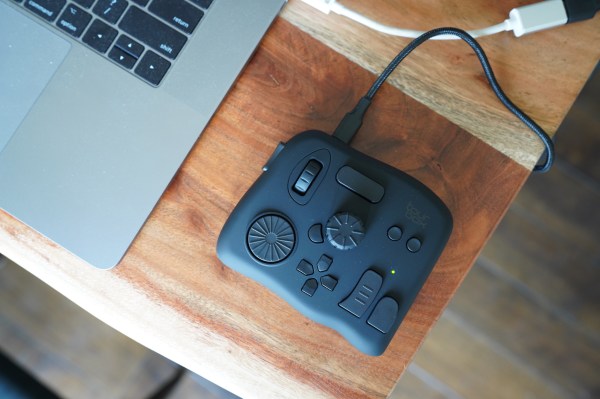
TourBox is a device that occupies roughly the desk space of an Apple Magic Trackpad, with a USB-C connection to plug into your computer. It’s equipped with a D-pad, two dials, a scroll wheel, and seven buttons. The TourBox software provides customizable controls for each of these, allowing you to assign keys to each.
Built-in profiles support popular photo editing applications including Photoshop, Lightroom and Capture One; video editing software like Final Cut Pro, Premiere and DaVinci Resolve; and drawing software including Clip Studio Paint. Each of the default configurations for these applications can also be customized depending on a user’s preferences and needs.
TourBox differs from other, more expensive devices in this category in a number of respects – it leans heavily on keyboard shortcuts, for instance, definitely simplifying software actions but not providing the same level of plug-in integration that competitors including the more premium Loupedeck+ and Loupedeck CT provide. Those are considerably more expensive, however, and what TourBox provides could suit the workflows of pros who are looking primarily to supplement, rather than replace their existing keyboard productivity workflows.
Design
The TourBox is compact, but feels sturdy. It’s heavier than I expected, which makes it more likely to stay put on the desk where you put it rather than shifting around during use. The exterior is a matte, rubberized plastic that has a nice aesthetic and a pleasant tactile feel, though it will pick up dust.
TourBox’s buttons and controls feature unique shapes and elements like raised spokes and ridges on the wheels to help you navigate the control surface entirely by feel. It produces a controller that looks very interesting because of its asymmetrical layout and exterior surface, but all of that actually makes it much easier to learn how to operate it entirely by feel after a little practice, which is key to long-term use in terms of actually ensuring the TourBox saves you time, by being something you can eventually basically commit to muscle memory.
While the design of the buttons and other controls makes a lot of sense, the actual feel of them isn’t all that great. There are some highlights, including clicky turning to help with fine-grained controls, but overall the buttons feel a bit mushy and generally don’t match up to the feel of the controls on other surfaces like the Loupedeck hardware mentioned above. Given the price difference, the lower-quality feel of the physical controls can be forgiven, and it doesn’t affect actual performance, but it’s something to keep in mind.
 Performance
As with any new hardware controller, the TourBox takes some getting used to, and the software that the company provides, while it includes a basic tutorial, requires non-obvious user tweaks like manual switching of profiles to work with different applications. There’s a major 2.1 update in the works that will deliver auto-profile switching, among a number of other improvements.
Once you learn how to use the TourBox software and spend some time familiarizing yourself with the profiles for the applications you use, TourBox is indeed user-friendly, and can save you a lot of time and extra keystrokes on most common functions, including things like zooming and panning, adjusting brush size, undoing and redoing and much more.
As mentioned, the unique physical layout and button shapes appear initially odd, but ultimately mean that you can develop a very memorable workflow using the TourBox that becomes second nature. By default, some of the modifier key combinations that were shipped in the software profiles required a bit of unusual hand gymnastics for me, but all of these are customizable so it was easy to make changes that resulted in more ergonomically friendly usage.
Bottom line
While there are a growing number of options when it comes to hardware control surfaces to help you create an at-home editing suite, the TourBox at $169 is one of the most affordable out there. It’s also an extremely portable option, requiring just one cable, which you can easily pack in just about any bag.
More demanding and pro users would do well to look at Loupedeck’s offerings, and the Monogram Creative Console provides a lot more modular customizability for a system that can grow with your needs, but for on-the-road editing and for enthusiasts who are just looking for something to make their editing easier and faster but with minimal fuss, the TourBox is a solid option.